

TL;DR: The article argues that product teams should curate their backlogs before prioritizing them. Prioritization only ranks existing requests, while curation removes ideas that lack strategic alignment, solve symptoms, duplicate functionality, serve isolated needs, or add unnecessary complexity. A clear product strategy, an empowered curator, regular backlog purges, and a transparent “won’t build” list help maintain focus and reduce the cost of backlog noise.
- Curation filters which ideas deserve to enter the backlog; prioritization ranks the survivors.
- The default response to a new request should be rejection unless its problem, evidence, and strategic alignment are clear.
- Use a single empowered curator rather than a committee, and require problem statements instead of proposed solutions.
- Review and remove weak items quarterly, and consider publishing a transparent “won’t build” list.
- Curation should occur after exploration but before commitment, following the sequence: inbound, curation, prioritization, commitment, and build.
A priority score only orders the work you already allowed into the system. Curation is the harder move: deciding what should not exist in the backlog at all.
Your backlog has 400 items. Your team delivers 20 per quarter. You run RICE scoring, Weighted Shortest Job First, or some homebrew priority matrix. And still, the wrong things get built.
The problem isn’t your prioritization framework. It’s that you’re trying to prioritise a list that should have been curated first. Prioritization orders a set of options. Curation decides which options deserve to be in the set at all. Most product teams only do the first step and wonder why their roadmap feels like a shopping list rather than a strategy.
Why prioritization without curation produces garbage backlogs
Any prioritisation method – RICE, WSJF, Eisenhower Matrix – takes a list of candidates and ranks them. If the list itself is unfiltered, the output is an ordered list of bad ideas. The highest-scoring item might still be a feature that fragments your product, solves a problem nobody has, or duplicates existing functionality.
Consider a concrete example. A team we worked with ran RICE scoring on two features. Feature A: “dark mode toggle” scored 80 (high reach, moderate impact). Feature B: “real-time alert integration” scored 70. The team spent two weeks debating the 10-point difference. Neither feature should have survived curation. The product was a control-room dashboard for environments that never dim lights. Dark mode added maintenance and confused UX. The alert integration duplicated an existing API. Curation would have killed both before they ever saw a score.
Curation is the gate before the ranking. It asks: does this item belong on the list at all? Does it align with the product’s job-to-be-done? Does it serve the current strategy, or is it noise from a stakeholder who attended a conference last week?
Most teams skip curation because it’s harder than scoring. Scoring is a formula. Curation requires judgment, product taste, and the willingness to say no to people whose approval you need.
The signal-to-noise ratio of a typical backlog
Look at your own backlog. How many items are older than six months? How many were added by someone who no longer works on the product? How many are phrased as solutions rather than problems?
A healthy backlog has a high signal-to-noise ratio. Every item should earn its place. The default state of a new request should be rejection, not acceptance. You need a reason to add something, not a reason to leave it out.
The cost of noise is not zero. Each low-quality item consumes mental overhead during grooming, estimation, and planning sessions. It distracts from the items that matter. It creates the illusion of progress when you close a ticket that should never have been opened.
How curation changes the decision flow
Curation changes the question you ask about each item. Instead of “how valuable is this?”, you ask “should this exist at all?” The bar is higher. The filter is coarser.
Concretely, curation means:
- Rejecting items that solve symptoms, not root causes. A request for a “better export button” might mask the real problem: users don’t understand the data format.
- Rejecting items that serve one customer at the expense of ten. Custom features for a single enterprise client that don’t generalise.
- Rejecting items that compete with your core job. A note-taking app adding a calendar view because users asked for it, even though calendars are a separate product category.
- Rejecting items that add configuration complexity. A request to “make the dashboard customisable” often leads to a settings page nobody uses, while the default view remains mediocre.
Curation is not gatekeeping for its own sake. It’s protecting the product’s coherence. Every feature you add makes the product harder to learn, slower to run, and more expensive to maintain. The best products are opinionated – they do a few things well and refuse to do the rest.
The trap of “we’ll deprioritise it later”
Teams often accept items into the backlog with the intention of deprioritising them. They tell themselves they’ll score them low and they’ll never rise to the top. This is a fantasy.
Items in the backlog create pressure. A stakeholder sees their request in the list and asks when it will be done. A new product manager inherits the backlog and assumes everything in it was vetted. The backlog becomes a political document, not a strategic one.
We’ve watched a team accept a “quick win” feature request from a VP, score it low, and then spend six months fielding monthly check-ins about when it would be built. The VP never dropped it. The team wasted more time defending the decision than it would have taken to build the feature. The real cost wasn’t the development effort – it was the erosion of trust and the constant context-switching.
Curation means saying no before the item reaches the list. Not “not now” – “not ever, unless something fundamental changes.” This requires a clear product strategy that defines what you will not build, not just what you will.

When curation fails: the edge cases
Curation is not a universal solution. It fails when:
- You have no product strategy. Without a clear definition of your product’s job, you have no basis to reject anything. Every request seems equally plausible.
- You use curation to avoid hard conversations. Saying “it doesn’t fit our strategy” is honest. Saying “we’ll add it to the backlog” and hoping it disappears is not curation – it’s cowardice.
- You curate too early. In a discovery phase, you need breadth. Premature curation kills learning. The key is to curate before committing to build, not before exploring.
- You delegate curation to someone without authority. If the curator can’t say no to a VP or a major customer, the process becomes theatre. The person with the product vision needs the organisational backing to enforce the filter.
Curation works when it’s backed by a clear strategy and real decision authority. Without those, it’s just another process that people will bypass.
A practical curation workflow
Curation doesn’t need to be complex. Here is a workflow that works for teams of 10-200 people:
- Define your product’s job-to-be-done in one sentence. Every item must advance that job or enable it. If it doesn’t, reject it. This sentence becomes your filter criterion. Write it on the wall.
- Require a problem statement, not a solution. “Users need to export data as CSV” is a solution. “Users need to get their data into Excel for analysis” is a problem. The solution might be an API, not an export button.
- Assign a curator, not a committee. One person makes the call on whether an item enters the backlog. The team prioritises from the curated list. This avoids death-by-consensus. The curator should be the product manager or the tech lead – someone who owns the product vision.
- Review the backlog quarterly and delete everything that doesn’t meet the bar. Archive it if you must. But remove it from the active list. A quarterly purge keeps the signal high.
- Publish your “won’t build” list. This is more useful than your roadmap. It shows stakeholders what you’re deliberately not doing and why. It builds trust and reduces repeated requests.
The relationship between curation and prioritisation
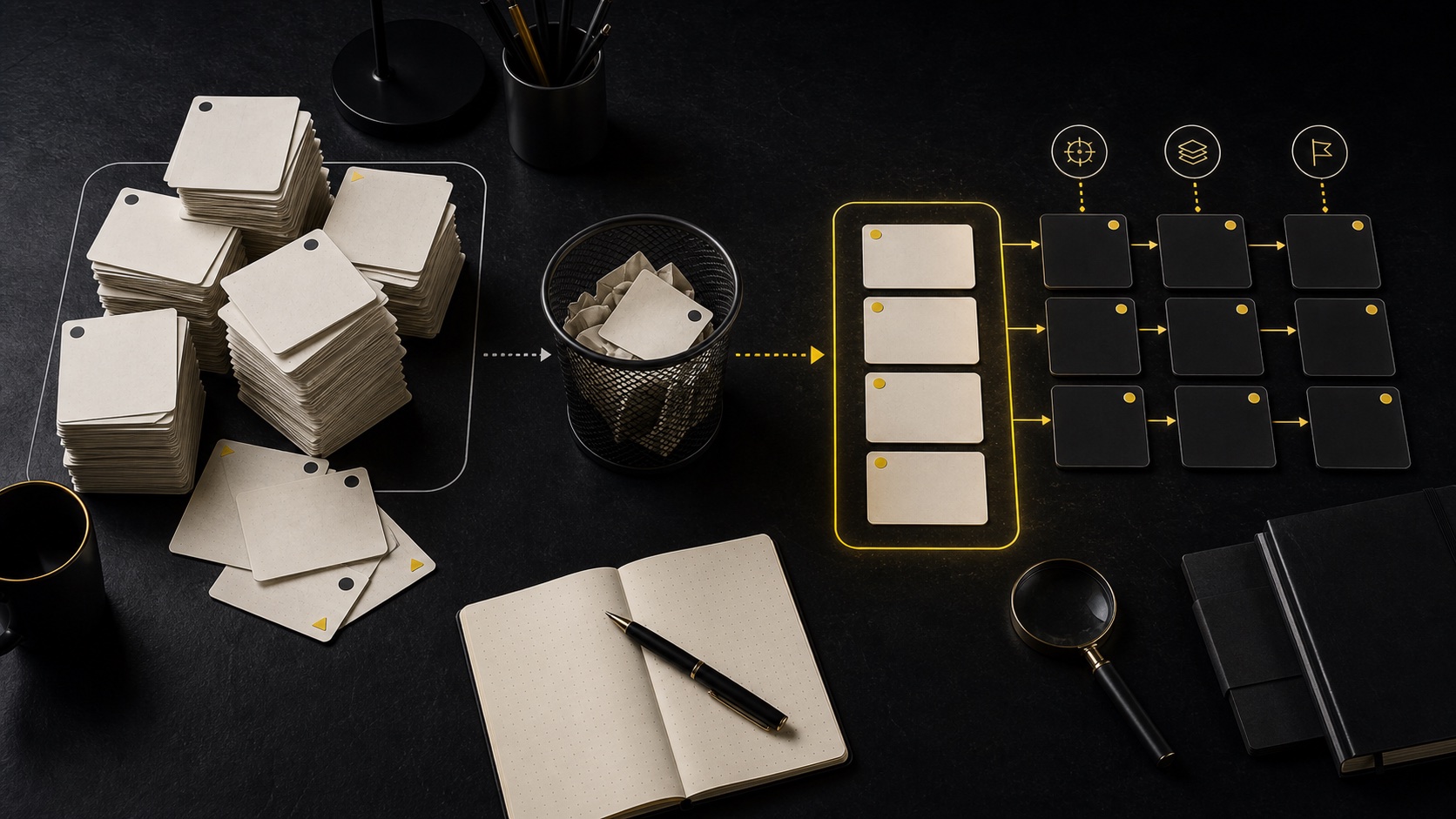
Curation and prioritisation are not alternatives. They are sequential stages in a pipeline:
Inbound → Curation → Prioritisation → Commitment → Build
Curation filters the inbound stream. Prioritisation ranks the survivors. If you do curation well, prioritisation becomes easier because you’re only ranking items that deserve to exist.
The mistake is running prioritisation on an uncurated list. You end up with a ranked list of 200 items, of which 180 should never have been proposed. The top 20 are marginally less bad than the rest, but they’re still not the right things to build.
Think of it like a hiring pipeline. You don’t rank every applicant who walks through the door. You first screen for minimum qualifications – that’s curation. Then you interview and rank the shortlist – that’s prioritisation. Product backlogs need the same two-step process.
Practical tips for implementing curation
- Start with a 30-day moratorium on new backlog items. Use the time to clean the existing backlog to zero. Then re-open the inbound channel with curation in place.
- Create a simple intake form that forces submitters to state the problem, the evidence, and the alignment with the product strategy. If they can’t fill it out, the item doesn’t get logged.
- Train your stakeholders. Explain that a curated backlog means faster delivery on the things that matter. Most people accept a “no” when they understand the reasoning.
- Use the “five whys” technique on every request. By the fifth why, you often discover the real problem is different from what was proposed.
- Celebrate deletions. When you remove an item from the backlog, treat it as a win. It means less noise, less maintenance, and more focus. Make it visible: “We killed 50 items this quarter – here’s why.”
For more on how product decisions interact with system architecture and team velocity, see our analysis of the knowledge debt crisis. Also, if you’re struggling with the discipline of saying no, consider whether your product strategy is clear enough to guide those decisions. A fuzzy strategy produces a fuzzy backlog, no matter how good your prioritization framework is.
Key takeaways
- Prioritization orders options. Curation decides which options exist. Most teams only do the first.
- A curated backlog has fewer items but higher signal. Each item carries less noise and more strategic weight.
- Curation requires a clear product strategy and the willingness to say no. Without both, curation is just another process.
- The default state of a new request should be rejection. Make submitters prove the item belongs.
- Curation and prioritization work in sequence: filter first, then rank.
- The cost of noise is not abstract – it’s engineering hours wasted on grooming and defending bad items.
Frequently Asked Questions
How do I handle stakeholders who insist their request goes on the backlog?
Explain that an uncurated backlog hurts everyone. Offer to review their request against the product strategy together. If it genuinely aligns, it belongs. If not, be transparent about why. Most stakeholders respect clarity more than ambiguity.
What if I curate too aggressively and miss a good idea?
Curation is reversible. You can always add an item later. The cost of adding a bad item to the backlog is higher than the cost of missing a good one temporarily. Keep a “maybe” list outside the active backlog and review it quarterly.
Can curation work in a startup where everything feels urgent?
Curation is more important in a startup, not less. Limited resources mean every build decision is existential. A curated backlog forces focus on the one thing that matters most. The alternative is spreading thin and building nothing well.
Who should be the curator in a small team?
In a team of 5-15 people, the curator is typically the product manager or the technical lead – whoever has the deepest understanding of the product vision and the authority to say no. In larger teams, you might have a rotating curator role, but the decision authority must be clear. Avoid committees; they produce the lowest common denominator.
Closing
Prioritization is a tool. Curation is a discipline. The teams that build great products don’t just rank their ideas well – they have the discipline to kill bad ideas before they ever see a score. Your backlog is not a storage bin. It’s a strategic filter. Treat it like one.
If you’re struggling with the discipline of saying no, consider whether your product strategy is clear enough to guide those decisions. A fuzzy strategy produces a fuzzy backlog, no matter how good your prioritization framework is.
Next step
Review backlog intake before adding another scoring model. Talk to DataTip.
Related Posts

AI Workforce Planning: Turn Productivity Into Capacity
BearingPoint's survey shows why AI productivity gains need workforce planning:…

Shopify vs WooCommerce 2026: The Maintenance-to-Scale Ratio
By merchant count, WooCommerce and Shopify dominate the market. For mid-market…

Your Logs Show What Happened. Product Teams Need to Know Why.
Product teams need more than logs. Combine events, user intent, qualitative…